by Linda | Oct 8, 2011 | my creative journal
As my cravings grew stronger, I was soon compelled to write a love letter…to my dearest coffee and make it a scrapbook page.

Here’s what I wrote:
Dear Coffee,
I have tried to let you go, substituting my mornings with a variety of other liquid refreshments for a change. But I really miss you and I’ve come to realize that resistance is futile. I need and want to drink you, my dear coffee. I long for you every morning and as the weather turns cooler, I miss your warmth even more. You might be my drug for life, but why should I be denied something so simple and wonderful?
I should not have acted so rashly, wanting to rid you from my life in attempts to be healthier. In fact, I have since learned that you are not so unhealthy after all. You give me positive health benefits in fact…with relatively few drawbacks. Oh my wonderful coffee, what have I done?
I really adore you so…
– I look forward to you every morning
– you make me more alert and boost my ability to concentrate
– you have a protective effect on my central nervous system
– you lower the risk of diabetes, Parkinson’s, and Alzheimer’s amongst other issues
– you actually contain some good vitamins and minerals
You are more good than bad, when consumed in moderation. You are my beautiful, warm, soothing, wonderful, delicate, enjoyable, smooth, flavorful, satisfying, magical stimulant. You are an important part of my life, so I surrender myself to you, my dear coffee. I am sorry to have betrayed you. Please take me back. Please accept my love and devotation from this moment forward.
forever yours,
linda
October 2011

I used my coffee illustrations as stickers and created the page digitally, then I printed it out on canvas paper – very cool texture. Then put it all together on kraft paper with old school golden photo corners. Super simple layout that truly reveals how I feel at the moment. In withdrawal 🙁
by Linda | Oct 5, 2011 | my creative journal
Search Engine Optimization or SEO is a term that usually scares most people away. It’s that complicated techy nerd stuff and I agree that most of us don’t have time to fiddle around with. That’s exactly the reason why you should learn the basics and work it into the best practices of how you communicate online…because your time is so precious.

In reality, SEO is not rocket science…in fact, we know that technology changes constantly and there is no exact science to SEO. Optimization simply means you are striving for the most effective result and I think it’s a way of doing things in general – that is why I say SEO is good sense.
We all go to a search engine like Google and search for the information we are looking for. SEO is an attempt to make your content show up when people are searching for it. Of course, there are tricks out there and methods to push your website up the ranks, but the search engines can readily change their algorithms and scoring methods. In fact, it happens a lot and many of the tricks no longer work and sites lose ranking that they spent a lot of time tinkering around to create.
What doesn’t change is the fact that search engines are trying to give the people what they want. If someone wants to find a plumber in San Francisco, it’s pretty clear what they expect the search engine to list for them. So ultimately, as a creative entrepreneur, artist, whatever your business…you want people to find you when it pertains to your business. In the crafting world, a whole lot of people get traffic from posting tutorials because it’s exactly something someone would search for – “how to make” or “how to sew” something.
So what best practices do you need to pay attention to when it comes to SEO for your small business?
- Write for humans. Tips and tricks aren’t going to last…ultimately, you want people to consume your content, so write for real people reading your content.
- Use descriptive titles and sections. I know sometimes we want to be clever or cryptic with our titles and it’s okay for the occasional blog post, especially when it is something cryptic or personal. But if you are writing a tutorial or article about a specific topic, please title it properly. Don’t unnecessarily confuse readers or lead them astray.
- Try to be descriptive with your image file names and add those captions, alt and title tags as well. Again, it’s just goes back to being clear about your content. If someone happens to link directly to your image, will they have any idea what it’s all about? I get lazy with these things as well, but at least try to do it for those posts that are meant to attract users like tutorials and information articles.
- WordPress users, I recommend the All in One SEO Pack to ensure your basic meta tags are in place.
- WordPress users should change the default permalink structure. Basically, when someone goes your blog post, do they see cryptic numbers and symbols in the address bar? That doesn’t help anyone. It’s so much better to have the category, the postname or some combination that makes sense to a human reader. Again, it’s just good sense!
Although I’ve learned many tips and tricks in SEO for building websites, the ultimate goal is really about being clear with your content. If you do a good job with that in mind, keeping everything as clear and descriptive as possible…you are doing a service to your readers in general…not just trying to boost your rankings. The icing is that your content will naturally be optimized. Remember that you are not competing with the big shots who have the money to hire a team of SEO specialists…because yes, there are people who’s sole responsibility in their job is optimize a website, manage paid campaigns and all that jazz.
If you are interested in learning more about SEO, blogseo is filled with informative articles.
by Linda | Oct 3, 2011 | DIY printables
I know that toothpick flags have been around for a while now and it’s no wonder how popular they are in scrapbooking and cardmaking. Toothpick flags are just so darn cute!

The supplies I like use are often difficult to find here in Italy. So I’ve decided to create my own through trial and error. Toothpick flags seem pretty straightforward to tackle. A simple idea, but you can create unique variations and combinations the DIY way!
Step 1 – Find some toothpicks!
I only have the plain jane ones. However, I’ve seen examples with little fork shapes and decorative tops as well. You might consider coloring them or using variations to create different types of flags.

Step 2 – Choose the material for your flags.
I’ve seen the flags made with patterned paper, ribbon and decorative tape (those washi tapes are all the rage). But I’m sure there are other materials that can be used. I’ve actually created my own designs and printed them on regular paper at home. Feel free to download the designs your own personal use below.

Download Toothpick Flag designs ZIP file
Step 3 – Cut and Fold Flags
Although you technically only have to create one side of the flag for a flat layout, I like creating the real thing for the full effect. This also gives you the freedom of flipping the flag around when using it in your projects. You can see from my designs that there are a variety of flag shapes as well. Experiment with the design, shape, size and length of your flags.

Step 4 – Glue Flags to Toothpicks
That pretty much finished the job. Tah-dah! I’ve found liquid glue to be stronger for this type of embellishment, but it really depends on your flag material. Just get those toothpicks to stick to the flag and you’re all set.

When using your toothpick flags, I’ve found that tucking the flag behind photos or journaling blocks helps to hide the adhesive used to attach the toothpick in place. However, sometimes I just put adhesive under the flag part and show the entire flag and toothpick. I’ve also seen ribbons and embellishments tied around the toothpick part as well.

Some more ideas
Once you’ve got the basic process of creating the flags down, you can start thinking about embellishments and fancying things up! Consider using fancy borders for your flag shapes as well as adding 3D embellishments onto the finished piece. The possibilities are really endless and even better, you can always use scraps of leftover paper to create a matching flag embellishment for your projects – pretty cool!

Let me know if you have any other tips, tricks or ideas regarding toothpick flags. I would be happy to try them out. For now I’ve created quite a collection for my papercrafting needs and having a lot of fun incorporating them into my work. Have fun!
by Linda | Sep 29, 2011 | my creative journal
Just when I was getting into Facebook for my business and blogging about it, they go and announce a whole new interface of changes. Goes to show how fast technology forges ahead and how important it is for you to keep up or at least be aware of what’s new. Otherwise, you’ll be left behind and honestly, won’t be able to evaluate if you should or shouldn’t spend time on the latest and greatest thing. I think it pays to be informed. For Facebook there’s a great roundup of the latest changes on Mashable…very helpful read.

I’ve been slowly coerced into joining several other social media sites, sort of test driving to see how it turns out…from Google+ to Pinterest. I’m still not sure what will become the go to way to communicate and share with others, but I figure there’s no harm in more exposure.

You’ll certainly be hitting different people and having a standing set of profile-type information across the web really helps to build up your credibility and presence. I’m starting a keep a folder of basic information about me, avatar photos, etc…so whenever I have to set up a profile, it’ll only take a few minutes.

You should also remember that technology is constantly being updated. Twitter has added a @Username and Activity tab, as well as updating the ability to upload photos to include in tweets. These little changes can really change the way you communicate and it’s important to work them into your routine. No need for Twitpic anymore!

What about the up and coming normalcy of ipads and tablet-like devices? Is your website easily readable on those platforms? I know it’s a lot to keep up with and it’s impossible to cater to all…but to a certain extent, you have to be aware and catch up one day. It is said that tablets will outsell laptops and desktops soon…imagine that! Consider the smaller size of tablet screens and the fact that we click with fingers and sweep the pages up and down…hmm…totally different experience. Also, most tablet browsers don’t support Flash (yet) and more than ever, bandwidth is an important issue. Super heavy to download sites aren’t probably so convenient for those on the go or browsing wirelessly at a cafe. Yup, more to think about. To me it seems to signal more than ever, less is more on your website.
So have you given yourself time to catch up a bit with technology these days?
by Linda | Sep 26, 2011 | my creative journal
While doing a bit of scrapping last week, a spark of inspiration suddenly hit me and I created my very own sewn journaling cards. I’ve realized that these cards are super handy for recording little moments and joys in life. I can write something out quickly before I totally forget, then scrap about it later when time permits.

Although there are many journaling cards out there in the market, my issue is always access. Living in a small town in Italy means that nothing new is around and everything takes forever to be mailed to you, not to mention the shipping and customs costs. So I try to go the frugal way and make things myself.
 Download colored journaling lines page ZIP
I decided to print out a page of rainbow colored lines – generally I like lines to help me handwrite straighter – you can go ahead and download the design for your own personal use above. Otherwise you could use lightly patterned papers or solid colors. I just sliced the page up into various sizes and combined them with solid colored cardstock. Nothing too difficult, but sewing the papers together adds a really nice touch of detail and decoration.

I created various sizes, experimented with sewing straight or zig zag as well as varying square corners and rounded corners. In the end, I had a bunch of cute journaling cards to use.

Here’s a photo of my first application, adding some stickers and string to dress it up. Pretty neat, huh? You can see the whole layout at 2ps btw.

Go ahead and try to make some of your own journaling cards! Do you have any other ideas? I’m loving them for my scrapbooking process these days.
by Linda | Sep 23, 2011 | my creative journal
So I’ve been away the past month and a half, vacationing in sunny Southern California with family…but now I’m back in the land of wine and pasta – desperately trying to get back into the groove, frankly. Although I feel rather groggy and overwhelmed even after a week+ of being home, there has been some creative progress in the works… the little lady weekly planners! It’s an artists’ collaboration headed up by anke panke design and I’m really honored to be a part of it.

I have to admit that see a stack of snail mail upon returning from vacation provided a nice deviation from unpacking and the regular ‘ole routine. I’m loving the planner! It’s a perpetual weekly type of planner, so start using it now or save it for the upcoming year – is it too early to refer to 2012?

There’s a whole lot of inspiring art within and there are actually a few cover variations to choose from…but I chose the girlie version and bought myself two copies. My precious little girl illustration is included…yes, I’m smiling from ear to ear and blown away by the quality of the print job.

If you are looking for a creative gift for the holidays or just want a dose of weekly art for yourself…please visit the custom planners Etsy shop. Lots of nice goodies available besides the planners. Thanks to Anke for wrangling it all together!
by Linda | Sep 15, 2011 | my creative journal
Many folks have sworn against using Facebook due to privacy concerns and many think it’s already old fashioned compared to Google+. However, I still think it’s important to establish your business presence on Facebook – get your business page up and running. You can check out some statistics on Facebook and see that it’s still the largest social network today with over 500 million active users daily. People log in multiple times a day and there are countless apps and connections to keep people Facebook-ing all day long.

What you may not realize is that you can sign up for Facebook and literally not use it, only because you want to set up your business page. A business page requires a person to manage it, that is why you must sign up with Facebook personally. But it doesn’t mean you need to start posting personal photos and playing Farmville. In fact, I recommend that you don’t waste time on those things. If you are already on Facebook, be sure to check on these privacy settings for your personal account. Otherwise, you can sign up for an account with your business information… to really separate personal from business. You have to be a real person and as a creative entrepreneur, that means you…but use your business email address and related information.
Setting Up Your Business Facebook Page
Facebook can seem really convoluted at times…and even I have trouble finding certain functions. I suppose there is just so much going on, so I thought to share the general process of creating your business page to help make it easier for creatives and artists alike. To create a page, there is usually a link under the main sign-up page or the easier to find spot for me is in the footer!
Once you click the link you’ll be taken through the process to create your page and they have updated the process to make it as user friendly as possible. Just follow the prompts and fill everything out to get started.

There are a few pointers I have to share though…
Now that you have a page, what do you do? Well, first of all, make sure all your general information and contact is included. It’s crazy how some businesses have a page and then barely any information on it. This is another representation of your business, so put up your profile picture, links to your website and shop and contact information.
- You can automatically get your blog posts onto the Wall through NetworkedBlogs and of course, just post directly newsworthy updates and links as well.
- Use the Events feature, so you can invite people to shows, openings and marketplaces happening around your business.
- Search through the many Facebook Apps available to add your YouTube Videos, Add Your Email Sign-Up, Create a custom Welcome Page, etc …
- Facebook has analytics for your page so check them! http://www.facebook.com/insights/
I hope these tips will help you set up your Facebook Business Page properly. It’s always good to have a presence when there’s such a huge audience out there for you to connect with. Give it a try and next week I’m going to explore a bit about advertising through Facebook. It’s really amazing…
by Linda | Sep 8, 2011 | my creative journal
What is Social Media?
Social media marketing is about getting traffic (publicity) for you and your business through social media networks like Twitter, Facebook, Google+, Linked-In and even your website and blog – wherever there is social interaction between you and others. Ultimately, it’s a pretty wide, catch-all phrase that people use to refer to the various ways we connect online and thus can promote online. It got me to thinking about how connecting with your customers and interacting with them already existed in the past, in traditional businesses, in traditional ways. People used to send updates via snail mail, from formal press releases to catalogs and handwritten notes. People used to call each other up on the phone, go out on lunches, visit the brick and mortar shop and chit chat to build relationships. All that still happens to some degree in real life. However, it’s increasingly more common to have initiated interaction online and in many cases, these relationships remain virtual for life.
 via Flickr birgerking
So when you think about social media, just think about interaction between people. Business to fans, friends to friends, supporters to artists…you get the deal. The difference is that online, it’s a whole lot faster and easier to interact. Innovations in technology – such as people getting real-time updates on their smartphones – makes it easy to spread a piece of news across the globe in literally minutes. That possibility created the idea of viral marketing…which was not really possible before we had all these nifty tools online. There’s a great video by Laura Roeder that illustrates how easy it is to get your brand in front of new eyes every day with just a tweet. I think we all understand the power of social media marketing…just as many creatives and artists have discovered the Internet as a portal to a whole world of potential fans. We can now connect directly to our customers with ease.
Define Your Goal?
Before you start signing up with every available outlet and blasting messages left and right, it’s important to understand your ultimate goal. I think a lot of folks have trouble with the idea of social media, because they don’t know what to say or do. You might fall into the trap of just broadcasting about you all the time…or the trap of just chit chatting randomly…ultimately, not yielding any results for your business.
So above all you need to decide what it is you are trying to accomplish. Are you trying to get your brand out there into the world? Get people to your website or shop? Get people to purchase your products and services? It’s probably a combination of those things, which is why I always recommend claiming your name on the most popular networks and always adding a call to action back to your website or shop.

Reach Different Audiences With Different Networks
Some folks don’t want to bother with social networks and I agree that it can be overwhelming as new platforms are created and the trends keep changing now and again. But it doesn’t have to take a whole lot of your time, if you simply schedule in tasks on a regular basis. Realize that you are reaching different audiences on different networks. So you have to decide which spaces might be a good fit for your type of business…or if it’s something everyone should jump onto, like Twitter (at least for now)! Just be sure to always point people back to your homebase – your website, blog or shop. Ultimately, you want to lead the audience back to you and your business.

What to Share?
Think like a consumer. What do you want to see and what makes you want to interact? Helpful information, useful tips and tricks around your interests, sales and promotions, the list goes on. I know folks who exclusively post “listed xyz” 24/7. How boring is that?! There’s no interaction in that…so that’s not being social, my dear. If you provide useful information, interested parties will interact with you and ultimately be led to your business (the idea is that you spreading content that relates to your business). Of course, interaction means you can also ask questions and throw in some lighter chit chat as well… you are human after all. Again, think about real-life interactions, common courtesy, chit-chatting in the office with colleagues and business partners. Today, you simply do this virtually and with a whole lot of people.
Some people go as far as to search out questions and answering them. Providing that service to people who are looking for help…will definitely attract attention, build respect and form connections. If you happen to provide a service that people ask a lot of questions about, providing useful information or advice, really plays into the interaction.
Measure Your Success
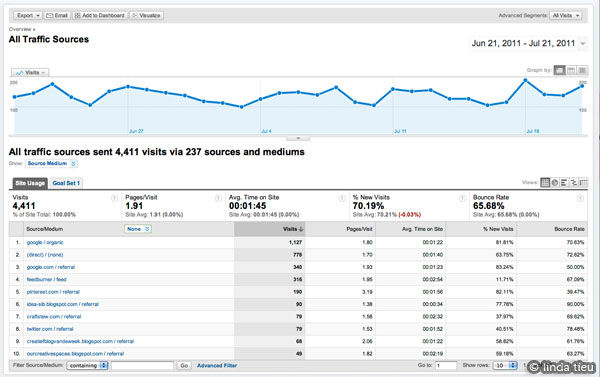
In the end, I do think it’s important to measure your success through analytics or some type of tracking. You can then make decisions about how much time you put into social media, what works and what doesn’t work. This really goes for everything you do! Even if you don’t like burying yourself into the numbers, a quick look will tell you what brings traffic to your site. Maybe you want to concentrate on boosting a certain source or changing a strategy and seeing if it makes a difference. I like to take a look at what pieces of information gets retweeted, liked and shared…to get a good idea of what people find useful. Do you know what sources give you the most traffic? Do you know which links people click on to go to your shop and so forth? Analytics might seem like a huge headache, another thing to learn, but it’s so important! You might be putting a lot of energy into something that simply doesn’t yield results. Or you might be neglecting a goldmine…that could boost you to the next level if you simply give it a bit more time. Yes, you must measure your success (and failures), so you can go back to your ultimate goal, adjust your strategy and keep on interacting and building your business up.
I hope you understand the value in social interactions and the broad reach you are offered through social media. Don’t miss out on a great opportunity, but remember to take action with purpose. Please let me know your thoughts and if you have any tips in the comments below. Thanks!
by Linda | Sep 1, 2011 | my creative journal
These past weeks, I have been concentrating a lot on email marketing in these creative business 101 posts. I’m sure it’s been a bit heavy for some people, so this week let’s get back to the basics and talk a bit about photography. A stunning photo can win people over…I’m sure it’s happened to you as well. So for sellers of products, it’s extremely important to get the best shot possible to showcase your products online. A bad photo just ruins everything, because it also makes you look a bit unprofessional. If you are a large format artist, you will also be using photography to capture the image of something not easily transferred into 2D perhaps…so it is even more important to take care in how you present your work. Even for bloggers, it’s super important to incorporate imagery. The visual element helps to capture people’s attention and break up the content of pages.

Even for those of us who offer services or digital products, photography still comes into play. The visual imagery and design elements you use in your business represents you and your brand. How do you want to look in the eyes of your potential customers? A bit shabby and unkept? Or dreamy stunning amazing, oh-wow-crap-look-at-that amazing?!

I think we all know the answer…or at least closer to the stunning side of the spectrum…rather than shabby, dark and blurry. Most of us have digital cameras and the fabulous thing about digital is that you can try a gazillion times until you get it right. I always have trouble with keeping my hand steady and have invested in a tripod even though I get lazy in actually pulling it out and using it!
However, I’ve also taken classes on basic photography and continue to look for photography resources. Here are some that I have found helpful.

I hope these resources will help you out in your creative business ventures. A great photo will only do good for your business. I know that oftentimes, even though I know the principles…I still get shabby photos. Understand that you have to decide for yourself, the level of tolerance you have…the quality you want ultimately. At some point in your journey, you might need to ask for help – to get a professional photographer when you’ve reached that level. It is worth it, when you are ready. In the meantime, I fully support the DIY movement and thank goodness for the digital format. We can now take as many photos as we need and delete as necessary with little investment. So there’s no excuse…you can certain get decent photos at the least! I’m constantly learning by using my camera more and more. So go take pictures, even if you don’t need them for a specific project. It’s just good practice.
If you have any other helpful links or tips and tricks, please feel free to share below in the comments. Thanks!
by Linda | Aug 25, 2011 | my creative journal
It has come to my attention that I’ve been writing about email marketing without having really mentioned the Can-Spam Act. No doubt you’ve probably heard of it before. It’s a law that has set rules and regulations for people sending email commercial messages.
If you look into the text you notice that applies to all commercial messages…oh, yes!
Despite its name, the CAN-SPAM Act doesn’t apply just to bulk email. It covers all commercial messages, which the law defines as “any electronic mail message the primary purpose of which is the commercial advertisement or promotion of a commercial product or service,” including email that promotes content on commercial websites. The law makes no exception for business-to-business email. That means all email – for example, a message to former customers announcing a new product line – must comply with the law.
Now it’s not meant to scare anyone into communicating about their business…even if it might seem big and scary. Much of it is about common sense and courtesy. If you sign up with an email service provider, they usually have certain restrictions in place to ensure you are following by the law…such as disclosing your location and providing opt-out options. Take a little read and make yourself familiar with the rules. I think it’s all very reasonable and easy to understand.
It’s funny because the people who don’t comply are the spammers we are trying to get rid of…but how do you report them, right? Please add your comments below. I think it’s important for everyone to understand the law…if they are going to use email as a form of marketing their business. Ciao ciao!