by Linda | Jan 30, 2013 | DIY printables

The Pixel and Paper Series highlights digital techniques and products for scrapbookers like you and me. I believe that everyone should consider digital elements to be a part of their scrapbooking toolbox, so let’s learn together what the possibilities are. Each week, I’ll be sharing the opinion of a real-life scrapbooker to reveal how they use digital in their scrapbooking. Each post will also offer a freebie download to help you get started on your pixel and paper journey. Enjoy!
Introducing… Elise Blaha Cripe
 A blogger, scrapbooker and designer, Elise is definitely a known name in the scrapbooking industry. I’ve been following Elise’s blog for quite some time and love how she shares so many aspects of her creative life, not just scrapbooking. I think of it as living a creative life and she’s also a great example of someone without kids who scraps a lot – even though she’s currently expecting! The news actually made me feel closer, because I’m also expecting my first child and it’s wonderful to read and share in our life experiences. Although Elise is a paper scrapper, she’s a designer as well who most recently designed the seafoam edition (Amazon link) for Project Life. She also runs her own shop and definitely uses digital tools in her crafty work and lifestyle.
Elise says:
My only digital tool at the moment is Photoshop Elements, and I am actually very happy with it. I use my computer to edit, resize and crop photos for printing almost everyday. I also create, with PSE, graphics that I print and use in my Project Life album (the quote cards are a good example of this) and I sometimes add text elements directly to the photos before printing.
I consider myself a paper scrapbooker because I like to put it all together “in real life” but I cannot imagine not using digital in some form or another for almost every project I do. 🙂
Project Life – Paper and Digital
For those who are into Project Life scrapbooking – whether the full system or taking some of the styles and ideas – digital tools are really indispensable. Elise uses digital titling, journaling, printing of quote cards and various designed cards for her Project Life and really shows how easy it is.


via Elise’s blog
Designing for yourself doesn’t have to be super complicated or fancy, sometimes it’s just text or beautiful usage of typography. I really love Elise’s clean style.
- Consider creating your own journaling and designed cards with quotes or existing imagery/graphics that you can readily print out
- Don’t hesitate to caption or title right on top of your photos
- Don’t forget that anything you see online can be printed out and used in your scrapbooking, take advantage of this!
Photo Editing
Digital photo editing is also a tool in Elise’s arsenal and I think sometimes we don’t take advantage of all the possibilities! Now that everyone has a smartphone, it’s easy to do on the go as well, so you won’t be spending all your time in processing photos. Apps like Instagram and Afterglow have made it super easy to tweak your photos. There are a multitude of actions that can be loaded into Photoshop as well, to give your photography a boost. Ultimately, making a small effort can really help to enhance your photography immensely. Elise wrote a post with tips on taking self-portraits and I think it offers great insight.

via Elise’s blog
- Try using your smartphone and all the latest apps offered to enhance your photography on the go
- Explore Photoshop actions available for to apply premade effects to your photos with a click
- Consider what a difference it makes to add titling, journaling, stamps and other graphics on top of your photos before printing
Try it for yourself
The take away is to remember how much power we hold in our hands these days with the technology available. With just a little effort, we can make a big difference in our memory keeping and it doesn’t have to be fancy or complicated at all.

To start you off this week, I’ve designed a journaling card that would be great for Project Life, but also on a traditional layout as a designed embellishment. In 4×6 size, you can use it as a title card or size it down for other pocket sizes – both horizontal and vertical versions. Hope you have fun using a little digital in your memory keeping this week.
Download BTP_HelloLifeCardSampler
If you like printables, be sure to sign up for my weekly newsletter for new designs, links to freebies and the latest from yours truly.
by Linda | Jan 16, 2013 | DIY printables
The Pixel and Paper Series highlights digital techniques and products for scrapbookers like you and me. I believe that everyone should consider digital elements to be a part of their scrapbooking toolbox, so let’s learn together what the possibilities are. Each week, I’ll be sharing the opinion of a real-life scrapbooker to reveal how they use digital in their scrapbooking. Each post will also offer a freebie download to help you get started on your pixel and paper journey. Enjoy!
Hello blog friends and new visitors!
 My name is Linda Tieu and I’m the little lady behind this blog, BackToPaper. I thought it was only right for me to kick off this series by sharing how I use digital as tool in my scrapbooking.
I’ve always considered myself a hybrid scrapper, because I create using both digital and paper. There was a time when I felt as if I had a scrapbooker’s identity crisis. Where did I fit in? Was I part of the digital crowd or paper crowd? I couldn’t be just one or the other and realized in the end that there was no need to choose. I am free to scrapbook in whatever way I choose given the project at hand and definitely find myself relishing the freedom of using pixels and paper.
There’s no doubt that I love the tactile feel of paper in my hand. The texture and dimension of having real layers and embellishments in my projects caters to my crafty side. I could not live without it. I also feel that it’s easier to share with friend and family when I have a physical album to show off to them, especially for older generations that simply don’t like the digital presentation of photos and layouts.
By sharing some of the ways I use digital for my scrapbooking, I hope to inspire you to try out some new techniques and methods. Expand your scrapbooking toolbox and most of all – have fun!
Photobooks & Photocollages
Oftentimes for big projects, events and vacations, I scrap everything into a digital photobook instead of individual paper pages. It’s the fastest way for me to compile a mass quantity of photos and keep it all the same style and theme. There’s huge cost-savings because digital supplies can be reused as many times as you want, you don’t have to buy x number of copies and you won’t run out of e’s in your alphabet stickers!

From my wedding and honeymoon to month-long vacations back to the USA – I’ve created and printed my photobooks through Blurb.com (affiliate link) for years. I like their imagewrap covers and premium paper selections. I often design everything from scratch as they allow print quality PDF uploads, but they also have services that are easy to use for non-designers.
I believe that photobooks are a great way to get all those photos together and printed, without having the pressure to create a full-on layout every single page. Those are usually too-big projects that never get finished anyway! I want to enjoy and share my photos asap… rather than have them pile up as another to-do on my list.
On the same vein, before printing my photos I sometimes photocollage them together. It’s so much easier to do this digitally, so you can take your time in cropping and arranging your compilation of photos. It’s really a superb way to get multiple photos into a layout. There are a variety of round-up and collage digital templates out there as well. Even if they are meant for digital scrappers, you could use them to just organize your photos. Then print and use the collage in your regular scrapping process!
Digital Titles
I’ve blogged before about creating titles digitally for my scrapbook layouts. You definitely save on all the alphabet stickers you would have to purchase and the styles out there are limitless. Using fonts to premade digital scrapbooking products…

Digital Embellishments and Elements
Since I design digital products, I most definitely use digital embellishments and elements in my scrapbook layouts. It’s like making your own products yourself and a pop dot here or there will instantly turn an image into a multi-dimensional embellishment. Most scrappers who purchase digital kits are purely digital scrappers. But I feel that those same kits can be really useful for paper scrappers as well. You can print your own background paper, create your own embellishments from digital elements and most definitely print journaling on cards and inside frames.

Multiple Copies and Digital Files
Finally, we all know that when multiple copies are required, digital really helps out. With a digital file you can send it instantly to anyone in the world with an Internet connection. When you want to distribute the work, you can print multiple copies and it’s often a lot of money saved than creating another paper version entirely. I have actually created 7 copies of a particular family albums to distribute and although I loved the results, it was a huge amount of work, supplies and time spent. If I would have done it digitally, I wouldn’t really have lost any quality at all!
Suffice to say that there are many advantages to the digital format. How do you use digital in your scrapbooking process?
To get you started off this week, check out the freebies section and feel free to use all the digital downloads I’ve offered thus far. I hope you enjoy, have fun and discover some new advantages of using pixels and paper. As this blog is titling, I’m all about bringing digital, Back To Paper!
by Linda | Mar 13, 2012 | my creative journal

Many people think of the conservation and preservation of fine art prints, but I want to challenge you to involve yourself in the creative expression and USE those prints. Since offering my Girls With A Message as downloadable printables, a lot of project ideas have opened up for me. I think that involving yourself in the art, not just admiring… brings you into the process and message. I think it’ll mean more, because you’ve put your unique touch into it.

I decided to decorate and embellish my art print, adding that glam that makes me smile with delight. I printed my artwork on photo paper, then printed just the bow of her hair onto cardstock and cut it out. BTW, see the color difference between photo paper and regular cardstock prints below?

I took that cut-out bow and covered it with some pink tinsel glitter – super glam and girly! I love it! Funny how it fits onto the magazine page image that I was using as scrap paper under. She looks mysteriously glamorous…

When my embellishment was completely dry, I put a bunch of foam tape on the back, so that I could attach it on top of my full print.

Working on a separate piece of cardstock means that I can experiment a bit, without directly working on my art print. It also adds an extra 3D pop effect and if you used temporary adhesive, you could probably switch out different decorations as well.

It’s a simple decorative element, but adds so much to the life of the print. A personal touch that makes me look and smile.

How can you decorate and embellish up your 2D images? Add some glitter, pop-up elements, put real earrings on her ears… it’s up to your imagination. Have any ideas to try out?
by Linda | Feb 28, 2012 | my creative journal
I know that when it comes to digital printables, most are worried about the process of printing at home. We want the best quality possible, but very few of us have professional heavy duty equipment! I admint that the process of printing seems to be a whole art form in itself! However, these days the technology available to us gives pretty fabulous results… and many independent artists selling art prints, actually print at home as well. Regular home printers are pretty darn good and I’m able to get really great quality prints with ease.

Most of us are able to print a quick photo at home with our inkjet printers and it works the same for art prints and other downloadable printables as well. There are many factors that contribute to a beautiful looking print and with a bit of testing and experimentation, I’m certain you’ll find what is acceptable to you – for your particular use at that time.
YOUR PRINTER
To print at home, you obviously need access to a printer. Most of us have inkjet printers…the most common for households these days. They have a lot of features and the trick is to inform yourself of what is possible. Of course, the more expensive the printer, the more quality and control comes with it. Artists in the business of printing their own artwork usually have large format printers that accept thicker, speciality papers. They usually have more control over their ink colors as well – 4 to 8 different ink cartridges. It can provide better picture detail and color quality.
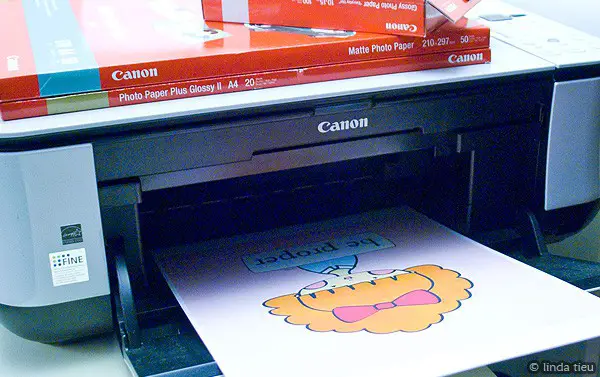
I personally have a very inexpensive “home office” Canon PIXMA MP240. It’s nothing special, but does give me a lot of flexibility when it comes to borderless printing at any custom size. It’s not the best out there, but the quality is pretty darn good and more than anything, it’s about understanding how to maximize my printer’s potential. Let’s use and make the best of what we’ve got!
INK
An extremely important aspect for me, is to use ink from the same brand as my printer. I know that it costs and might seem like all the same thing in the end. But if you think about it, there’s a compatibility when you use products from the same company – whatever that company might be. They test and use their own products, so that it works together. When they claim that pigment ink can last up to 100 years, it’s on their paper and using their ink.
I personally don’t know if the generic brands are really the same thing chemically or not. However, instead of fussing around with injecting refills which I abhor doing… I always go with the name brand. I think it’s totally worth it and makes a difference. There are exceptions I’m sure and I think the only way to go is to test and see what works for you at the best price.
PAPER
Another major component in the quality of your print is the paper choice. In fact, I think it’s a pretty HUGE deal. I use Canon brand papers with my Canon printer, but sometimes opt for other professional papers as well. The key here is professional. There is a huge difference. Just do a comparison. Print on regular paper, on photo paper, on canvas, different brands, etc. You will see the difference in vibrance of color when printing on regular cardstock versus photo paper. Perhaps you can see in this photo how much more bright and true to color the top sheet is – matte photo paper, versus the bottom which is regular cardstock – same printer centers. It’s about how the paper absorbs the ink.

The bottom sheet looks completely washed out by comparison, right? And no, my printer was not running out of ink, I actually printed on the cardstock first and realized my mistake! The reason why photo paper looks so much better is because it’s manufactured to capture vivid and bold colors. The ink doesn’t sink down and become absorbed by the paper and fibers. That’s why there’s always a right side to print on and the back side, has their logo and looks dull. I also print on high resolution paper that is much brighter white to begin with – ever realized how dull and yellowish regular copy paper looks? That aspect also makes a difference in your end product.
Your best bet is to print test prints on the different types of paper you have. Just print a tiny 1inch by 1inch square, something large enough so you can compare with perhaps a crop or graphic that has different colors. You’ll see the difference in how your paper takes your ink and can make a judgement from there. Obviously, for whatever budget you have, get the best quality you can afford and go with that.
SETTINGS
A huge tip when printing from home is to set your printer settings on the best quality possible. There is a noticeable difference between high quality and standard quality in my experience. Some people don’t use the high quality because it uses more ink, so you just have to do a bit of testing and see what is acceptable for you.
Selecting the specific paper you are using also makes a difference. If you think of a putting a puzzle together, when you have all the right settings, your image will look great. When you don’t have them matched up properly, it can be off. Dig into the printer menu and settings! Look through everything and understand what options your printer has.

I usually print directly from the preview image program on my Mac – simply because I prefer the menu options. Of course, you can print from any graphic program and simply open up your printer settings specifically.
Things to check:
- What are you printing, how many copies? Consider doing a test first! Can you see a preview?
- Select your proper paper size
- Select the proper sizing for your image – do you need to scale it down? (my girl art prints are 10″x10″ at 300dpi, so you usually will be sizing them down. the even number makes it easy to just enter percentages for whatever size you are going for, 50% for 5″x5″, etc)
- Select the proper paper type – it makes a huge difference!
- Select the highest print quality possible

I have certainly run into problems myself when printing at home, but I know from experience that it simply took a bit of education and experimentation to find the sweet spot. When I tried all the Canon products together, my prints looked pretty fabulous! In fact, I have upgraded and use even the super thick fine art museum etching paper – and WHOA it makes a huge difference!

So give printing at home a try and know that it takes just a bit of experimentation to maximize the use of your printer. These days, the quality is really fantastic.
I should note that if you aren’t satisfied with the quality at home, you can always send the image to a profesional printer or even a photo printing service. Anything printed as photo quality looks significantly better!
Let me know if you have any tips and tricks for printing beautiful artwork at home. How you find the process of printing at home? I know that with different equipment and materials, we will all get different results. I also know that some artists cringe at the thought of letting others control the quality of their work. However, I want my girls to spread far and wide and I want people to see them and feel better seeing them! Even if it’s maybe not that vibrant of a print, I don’t think it degrades the worth of the original work and idea. I think that the power of the visual imagery and message, still carries through. So although it’s wonderful to see the high quality prints, I think the not so professional copies still have just as powerful effects. I suppose that in this digital age, it’s no longer about that physical tactile item sometimes. It’s much greater and intangible…
by Linda | Feb 23, 2012 | my creative journal
Last week, I wrote about my doubts in offering digital downloads of my artwork and the dilemma of wanting to get my work out into the world, but still retain ownership and rights. Although I do not know if there is a huge market for digital downloads of artwork, people seemed to like the general idea – even though they shared my concern for piracy. Offering the print quality source file for sale, brings up immediate concern of attracting copycats and scammers in this world. Some might even say that it goes against the “fine art print” aspect of Art.

The topic of infringement in the art world has been discussed and blogged about so many times. Every now and again, a shocking infringement case will surface and our little world is rattled up with fury. I certainly cannot make sense of how people can blatantly copy and not feel and know in their bones that it is wrong.
But then again, there’s a whole lot of people in this world driven to do bad things. There are many reasons, albeit not justifications… but it doesn’t change the fact that there will always be risk involved, in all facets of life. We fear so many things, but we can’t let that fear control us and bind us down. We can listen to that fear, but then… we figure out what we will actually do.

After much thought and consideration, I’ve decided to offer my Girls With A Message series for sale as digital downloads. (Note: no longer available online)
We live in an everchanging landscape and I want to embrace the technology that we have available to us. This will be my little experiment and I certainly have my reasons for taking a chance. I know there are those who don’t even consider digital art as a true art form. However, it’s always a question of time and education for people to accept new ways. Instead of concentrating on all my fears and worries, I want to look forward to all the pros in this situation.
- Digital downloads = instant gratification
- Reach anyone in the world with an Internet connection
- Unlimited quantity to spread, so everyone can enjoy my work
- No shipping fees for you the customer
- No packing materials for me to fuss with (I live in Italy and 99% of my supporters live out of this country)
- With the source file, you can always renew your prints – just print it again!
- Variety of applications since one could print on paper, cloth, transfer paper…
- Or even use digitally as your desktop, screensaver, phone wallpaper…
- Easy to change the size in proportion with digital files, print at 100% size or a mini copy to use as notecards
I certainly don’t want to encourage piracy, because the digital copy is for personal use only. I’m doing my part in officially copyrighting and registering my work, but I know the risk is there. I think the digital format makes it easier for people to mis-use the work. But that isn’t going to stop the rise of the digital revolution. Ebooks are everywhere and so convenient – taking over the publishing the world.

The funny thing is that I’m already offering my work digitally. I design digital scrapbooking products at CatScrap and have my own digital stamp shop. Why the hesitation for art prints? I have to admit, there must have been some kind of haughty, snobby, worth-more thought in my mind… and I realized that it’s silly. It’s all my work and I put the same passion into my efforts, no matter what the end result becomes. I’m already out there in the digital world, why not go full force?
And in a way, I would love for my girl illustrations to spread like wildfire. It’s funny how the messaging is urging me take the leap as well. Ultimately, the whole point is to spread all the positive and motivational messaging. I hope that people who support me, would simply direct interested parties to buy their own copy of the download. It’s really the same situation for any kind of product that can be scanned and ripped off. The risk is not stopping people from releasing their work and becoming successful. I figure the best way to combat the fear, is to work on getting my girls out there and known. There will be no question that I’m the illustrator and ultimately, to be recognized for one’s work… that is a great feeling of success. I believe true fans will come back to the source. I also believe that if I put my good intentions out there, it can’t be a bad thing. Good things will come out of it.
I’m going to let go of fear and shoot for stars… please wish me luck!
Also, here are some articles around the topic of copycats and copyright for artists:
Pikaland – Copycat Lessons We Can Learn
Fine Art Views – Don’t Fear The Copycats
Kate Harper Blog – Fear of Getting Your Art Stolen? Look at the Numbers
Protecting Your Art: Interview with Alyson B. Stanfield
EmptyEasel – Copyright Information for Artists: How Copyright Laws Protect Your Art
Tara Reed – How copyright infringement is like stealing my sandwich…

 A blogger, scrapbooker and designer, Elise is definitely a known name in the scrapbooking industry. I’ve been following Elise’s blog for quite some time and love how she shares so many aspects of her creative life, not just scrapbooking. I think of it as living a creative life and she’s also a great example of someone without kids who scraps a lot – even though she’s currently expecting! The news actually made me feel closer, because I’m also expecting my first child and it’s wonderful to read and share in our life experiences. Although Elise is a paper scrapper, she’s a designer as well who most recently designed the seafoam edition (Amazon link) for Project Life. She also runs her own shop and definitely uses digital tools in her crafty work and lifestyle.