by Linda | Mar 26, 2013 | my creative journal
Recently I had the opportunity to create a Blurb Designer Photo Book as an early bird trial, so wanted to share the results with all of you. For all scrapbookers out there, photo books are a great way to compile your memories together quickly for sharing with friends and family.

When I got back from the hospital post-labor, I didn’t have much time to do anything with a newborn, not to mention I was still recovering physically from a difficult labor. But even in those conditions, I had no trouble putting together my photo book using one of the designer templates.

You basically prepare your photos, then go into Blurb, choose a designer template and upload your photos to arrange using their software online. It was a quick and easy process!

I received my little minibook extremely fast, even located here in Tuscany, Italy and I’m really happy with the results. The book is so well made as I chose the dust jacket and linen cover. Talk about professional!

What would I change? Well, I should have color processed my photos, but in all my haste, I just used phone photos and such completely untouched and unedited. So the quality is a bit inconsistent due to the photos I chose. I believe they look duller in real life than on my computer screen generally.
The other thing is that I would get imagewrap instead of the dust jacket cover. I simply wanted to try it out, but I think it’s hard to predict how photos will print on the dust jacket paper as well. I’ve done photo books with the imagewrap cover and like those results better.

Overall, I’m happy with the results and this little book has been great for those visiting our newborn and asking about the whole experience. It’s all encapsulated in the book and they can flip through to see.

Full disclosure, I was given the opportunity to create the photo book for free, so I went ahead and tried it out. However, I have used Blurb many times before – in fact, all my photo books are printed through Blurb. It’s just that I usually design them myself, rather than use a premade template. Hope this information has been helpful to you.
Blurb is graciously offering a 20% discount for my readers… so take advantage!
Offer Code: DESIGNMYBOOK | What it’s good for: 20% Off Designer Book Templates only* | Expires: 3/31/13
*Fine print: Get 20% USD, AUD, CAD or EUR off your Blurb Designer Bookify product total up to $150. Offer expires March 31, 2013 11.59pm local time. May only be used once per customer and on books created by you. May not be combined with any other coupons, volume discount or applied retroactively to previous orders.

by Linda | Mar 25, 2013 | my creative journal
While Spring cleaning here and there, I thought it would be nice to share a peek into my collection of sketchbooks and journals.

I’ve actually collected a lot of old work and scraps and bound them together into a journal as well. I often doodle on loose sheets, so my journals are in no way chronological or organized. It’s just a random smattering of visual ideas really.

I think that with all the sharing online, we often forget about the original purpose of sketchbooks or art journals or whatever you want to call it. It’s simply a place for you to work out your musings. It’s not really meant to be displayed to the world. I have realized that sometimes I might be creating something to blog about it, instead of creating as naturally as possible… without the thought of sharing.

It’s probably the curse of blogging, because I am constantly wondering what I should and could share on this blog. It’s not the only driving force, but it has become one aspect that drives my creativity.

Perhaps it’s good to have a bit of accountability, but at the same time… I think it can deter and deflect our efforts oftentimes.

Do you regularly sketch and journal away? Do you ever think to share or is it a completely personal practice?

I often see other artists’ sketchbooks and feel a bit envious. They can be so amazing, so neat, so full of ideas.

But I have to remind myself that those are select pages… it’s not the whole picture. We could never understand completely how it feels to be in another person’s shoes.

I suppose the important thing is to just create. Don’t stop. Let yourself go and somewhere here and there… you’ll have some great ideas. Hope you enjoyed this peek into my sketchbooks…
by Linda | Mar 25, 2013 | DIY printables, my creative journal

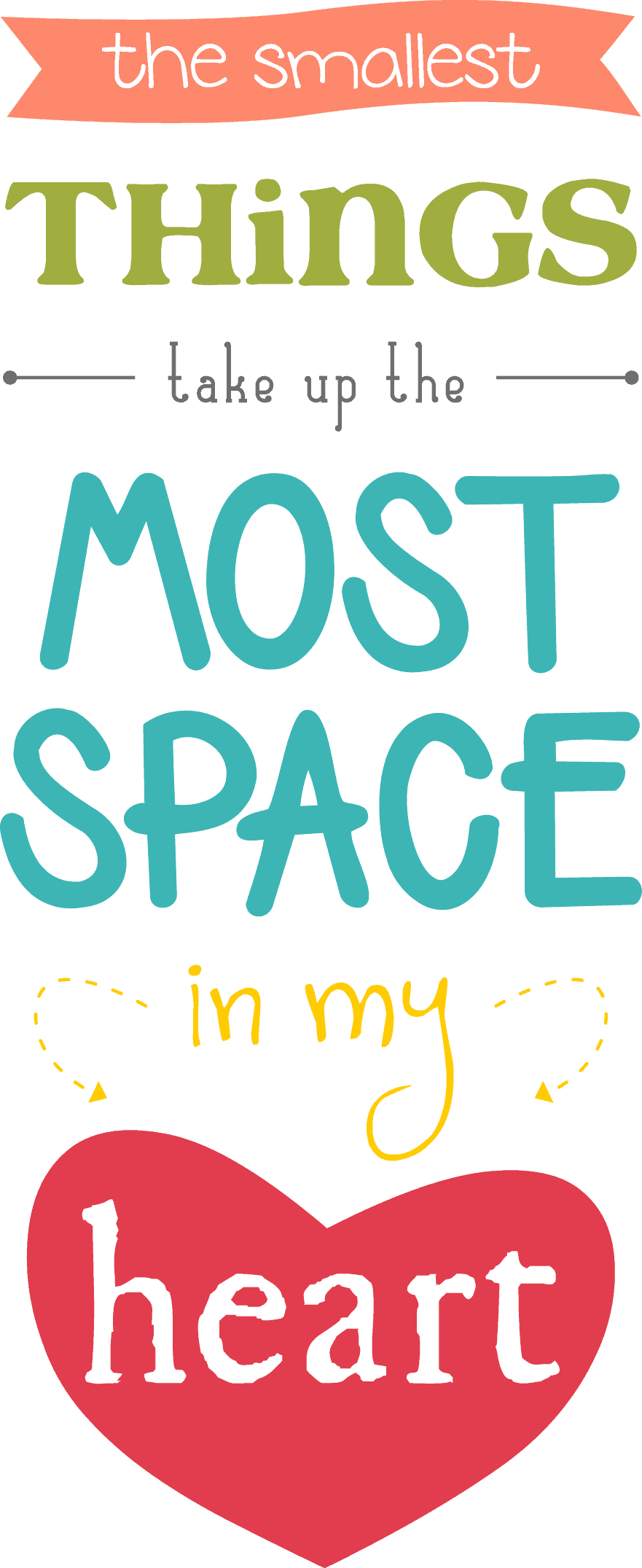
Sometimes I want to scrap a photo and don’t have much to journal… it’s just a feeling, you know? That’s why this design – the smallest things take up the most space in my heart – sort of says it all. It’s probably easy to gush about my kids, but it’s not always something I want to write out. Our beautiful little boy… it was enough with the word art, clean and simple design. I created the word art as a free printable the smallest things take up the most space in my heart and made a scrapbook page with it.

It might seem like such a plain layout to so many scrappers out there, but I like it just the way it is. I was tempted to write something in the blank white space, just because… but realized that there’s no need to add more. We scrapbook for ourselves, so why force it to look a certain way or be more complete or specifically designed? In the end, it’s not what matters the most, right?
I thought it would be nice to share this word art I created as a free printable as well. It’s a free image download, you can click on the color version or black and white version to use for your personal uses – I hope that it helps you to scrap and create something fun.

Click on images to get the full-sized versions

Enjoy! If you like my design printables be sure to sign up for my email newsletter for more freebies and the latest updates!
by Linda | Mar 20, 2013 | DIY printables

The Pixel and Paper Series highlights digital techniques and products for scrapbookers like you and me. I believe that everyone should consider digital elements to be a part of their scrapbooking toolbox, so let’s learn together what the possibilities are. Each week, I’ll be sharing the opinion of a real-life scrapbooker to reveal how they use digital in their scrapbooking. Each post will also offer a freebie download to help you get started on your pixel and paper journey. Enjoy!
Introducing… Ali Edwards
 If you are a scrapbooker, you probably know Ali Edwards as one of the gurus in the industry. Seriously, there are so many people that follow her blog and have journeyed along with her scrapbooking story. There’s no doubt that her philosophy, techniques, designs and thoughts have impacted the industry and community of scrapbookers. From projects like December Daily and One Little Word to a multitude of products and published books (Amazon link)…
 Ali is definitely what you could call celebrity.
I was immediately attracted to Ali’s design and style, but also her philosophy and thoughtful process of scrapbooking. It’s always interesting to follow along her process and join in with the various memory keeping projects she embarks upon. She offers a lot of information on her website and even an intro to digital scrapbooking. I always find myself inspired and wanting to scrapbook and I suppose that is why so many follow her blog. So I had to ask Ali about how she personally uses paper and digital tools…
Ali says:
Just about every layout/project I do incorporates both my computer and paper scrapbooking products. I love that they work together so very well in helping me to get my stories told.
My process ususally begins by opening my photos in Photoshop before printing. It’s there that I add my digital word art, frames, or journaling directly onto my photos. From there I print my photos here at home (either on an Epson PictureMate Show printer or an Epson R2000 over-sized printer) and then add them either to Project Life or to a cardstock paper layout.
I also print out digital Project Life journaling cards and add those to Project Life.
Digital and paper go hand in hand
I think that Ali is a great example of a scrapbooker who uses everything around her to create in her own unique style. From digital to paper, techniques, inks, sprays, various products, graphic design… it all goes together and gets interpreted through her lens.

via Ali’s blog
If you take a look at her layouts, you’ll notice how much variety there is and often you can tell what is digitally printed by her at home or what is manufactured product.
 via Ali’s blog
The idea is that digital and paper go hand in hand. There’s no reason not to use the digital designs and tools at your disposal!
 via Ali’s blog
Try it for yourself
I recently created a piece of graphic word art for a layout about my newborn son, so decided to share it with all of you. It’s definitely a bit in the style of Ali Edwards, in terms of being a graphic clean style. You can use the color version directly or alter and color using the black and white PNG file. In fact, it would be cool to clip different pattern papers to various parts or use a digital cutter perhaps to cut the design out? Have fun and happy memory keeping!

Download BTP_TheSmallestThings
If you like printables, be sure to sign up for my weekly newsletter for new designs, links to freebies and the latest from yours truly.
by Linda | Mar 13, 2013 | DIY printables
The Pixel and Paper Series highlights digital techniques and products for scrapbookers like you and me. I believe that everyone should consider digital elements to be a part of their scrapbooking toolbox, so let’s learn together what the possibilities are. Each week, I’ll be sharing the opinion of a real-life scrapbooker to reveal how they use digital in their scrapbooking. Each post will also offer a freebie download to help you get started on your pixel and paper journey. Enjoy!
Introducing… Loredana Bucaria
 After moving to Italy, I started exploring Italian blogs as well and stumbled upon Loredana Bucaria. She’s a very prolific scrapbooker who says that it’s a part of her lifestyle, not just a hobby. She blogs in Italian and English, so I find it helpful for learning the language as well. From teaching classes around the world to creating projects for Sizzix – I was immediately drawn to the variety of tools she used in her memory keeping and wanted to invite her to share.
Lory says:
Digital and paper are only different tools for a common goal! I want to say more – I love to add some digital elements to my scrapbook pages or projects, printing them for example. I use digital brushes for example on my photos or I print and cut them to make project life tags or journaling spots. I am both of them – I love both of them and I don’t think that they are separated areas of scrapbooking, they come together 🙂
From digital to paper
I think that we often forget that digital elements can be easily transformed into paper elements for our scrapbooking. From digital stickers to brushes to graphics and kits. Print and use, especially great for project life and journaling cards in general. There are so many designs out there and it’s instant gratification, because you can find whatever you need, purchase and print all in a few minutes!
Let’s take a look at a page Lory created for us…

Title: photography class
Materials:
patterned papers: kesi’art and ki memories
printables : studio calico
stamps: studio calico
embellishments: studio calico kits, wash tape, jenni bowlin, american crafts, ki memories, tattered angels.
tools: sizzix big shot and thinklits border
About the page:
Hello everyone! I am so honored to have received a lovely invitation from Linda to know what I think about digital and traditional scrapbooking and how they can be mixed together! I find that they are perfect together because you can create your own little embellishments, cut out some tiny tags and place them around your page to give it a cool touch and a lovely meaning to your photo.
So play and have fun mixing many different ways to use digital scrapbooking in your traditional pages 🙂
Loredana Bucaria bio:
Hello everyone I am Lory from Italy. I am a so funny and silly girl of the south of Italy, I love the sun of my city, I am a life lover, I love to tell stories about my everyday life.
I knew scrapbooking in 2003 thanks a friend and a little journey in a Funfair Park where I was actracted by a scrapbooking book full of colors and of die cuts ! Since then I made a long internet research about this hobby and I was really lucky to discover a new wonderful world !
Since then my life is changed ! Scrapbooking is become my lifestyle,it helped me in bad moments, like my dad’s death, I met new good friends around the world by internet , all thanks to scrapbooking.
I love scrapbooking because it makes me happy, free, with the scrapbooking I forget all the ordinary worries, all the bad thoughts and only the page, the photos, the story about the photo exist ! I loves to be sitted down on my chair ,close to door of my scraproom and be in my scrapbook space with music in background to scrapbook her pages full of colors, of several and sometimes unusually materials. All for fun and for relaxing ! I have a big dream : to can teach around the world, it should change my life, I’d do what I really want to do! In Italy I have an online website and I have organized an international convention of scrapbooking and mixed media for three years (2008-2010) knowing the most famopus scrapbookers and enjoying so much everything!It was a dream came true! I am solar, joyful, full of things to do but I love my everyday life even if something is not like I would.I’ve got married last july with the love of my life and now I have a new so cute home that I improve day by day.I love my life even if I am not a Hollywood star!LOL
I love to play with colors, the paper smell, the little things to can use! I can define my style colorful and pretty, clean and full of little details!:) I love to play with paper! Currently I am in the following design team: Sizzix UK, Bella Boulevard, Chic note Tags, I work for Cèline Navarro’s blog and for a uk magazine. I am crazy for letters stickers, labels stickers, kraft paper and envelopes and I can keep saying a lot of things I adore in this magical world!
I love scrapbooking so much, that’s all, Scrapbooking is my life and I hope one day to can come at the CHA. I love the colors , the smell of the papers, I adore to touch and to play with embellishments, looking at them thousand of times and being happy to have them in my hands, It’s an amazing feeling that I can feel when I create! I really really hope to can be chosen 🙂
I have a blog : www.lovescraplife.typepad.com that is my happy place! The place where I wrote about me, my life, my projects, my everyday life, my travels, my adventures! It’s my lovely place. A place where you will can find a lot of inspirations and you will laugh out loud with me of me 🙂 I am so ironic! Come and take a cup of coffee with me 🙂 It would be a big pleasure!
Lory
Try it for yourself
I love how Lory incorporated printed items in her page and you can’t even tell what was digital or not. It’s amazing the power we have in our hands today. To help you try out using printables in your scrapbooking, download the everyday sampler pack below and have fun memory keeping!

Download BTP_EverydaySampler
If you like printables, be sure to sign up for my email newsletter for new designs, links to freebies and the latest news.
by Linda | Feb 27, 2013 | DIY printables
The Pixel and Paper Series highlights digital techniques and products for scrapbookers like you and me. I believe that everyone should consider digital elements to be a part of their scrapbooking toolbox, so let’s learn together what the possibilities are. Each week, I’ll be sharing the opinion of a real-life scrapbooker to reveal how they use digital in their scrapbooking. Each post will also offer a freebie download to help you get started on your pixel and paper journey. Enjoy!
Introducing… Lain Ehmann from LayoutADay.com
 A veteran in the scrapbooking industry, Lain is the leader of the Scrap Happy community and blogs at LayoutADay.com offering a whole bunch of online scrapbooking events and classes. I’ve participated in Layout A Day (LOAD) before and find it the most inspiring experience. It might seem a bit much to scrap every day for a month, but it truly allows you to discover your style. The intense month of scrapping forces you to boil down to the essentials of what scrapbooking really is for you – I loved my experience!
So I had to ask Lain what she thought about digital tools for scrapbooking. She’s primarily a paper scrapper, but certainly has a great perspective.
Lain says:
I don’t like ANY kind of divisions. We’re all doing the same thing – memorializing our family and our memories. HOW we do that does not matter. We will have more and more tools at our disposal over the coming years.
I love using digital elements to create journaling cards for my pages. I use Photoshop Elements to resize and customize these elements for my pages. Then I print them on cardstock and add them to my paper pages. I can see myself adding more digital tools and techniques to my pages over time. I can’t wait to see what’s next!
Use digital to create paper embellishments
It’s a great idea to transform digital designs into paper embellishments, basically creating and printing whatever you want. For those who use graphic programs, the sky is the limit in terms of designing little tidbits for your memory keeping. From journaling cards to background paper patterns to graphics for decoration. However, there are a multitude of digital kits available out there and they should not be limited to only digital scrapbookers. You can always print out those designs to be used in your paper scrapbooking.
In fact, I do that quite often! I print out background papers, journaling cards, word art and graphics onto cardstock and use them as if I bought them at the store. The beauty of digital is that I can print as many as I want in different sizes and even alter the color if I wanted to. Pretty darn cool, huh? While we are on this topic, there was recently also a post on Shimelle’s website listing 5 ways a paper scrapbooker could use a digital kit.
Try it yourself
I like having my scrapbooks on real-paper and adding layers, textures and embellishments. So printables are a great digital supply, because you can use again and again. Here’s a cute little birdie graphic that you can print out and use in your own memory keeping.

Download BackToPaper_Bluebird
Maybe for a page about your Twitter tweets, a little birdie said or a Spring season memory? Enjoy and feel free to share your pages in the comments below. Would love to see what you create or what you think about using digital for paper scrapping.
If you like printables, be sure to sign up for my email newsletter for new designs, links to freebies and the latest from yours truly.
by Linda | Feb 20, 2013 | DIY printables
The Pixel and Paper Series highlights digital techniques and products for scrapbookers like you and me. I believe that everyone should consider digital elements to be a part of their scrapbooking toolbox, so let’s learn together what the possibilities are. Each week, I’ll be sharing the opinion of a real-life scrapbooker to reveal how they use digital in their scrapbooking. Each post will also offer a freebie download to help you get started on your pixel and paper journey. Enjoy!
Introducing… Stacy Julian

If you’ve been into scrapbooking for a while, I’m sure you have heard of Stacy Julian. She was the editor of Simple Scrapbooks magazine, creator of the Library of Memories system and founded Big Picture Classes – a thriving and amazing community of scrapbookers learning and sharing together online.
I’ve taken many classes at BPC and love all my experiences. It’s great to be able to connect with a nice community of creatives, no matter where in the world you live. There’s also such a variety of classes to choose from, so I’m never without inspiration to scrapbook. From workshops to self-paced classes, there’s a huge fountain of ideas to draw from.
I think that the impact Stacy has made on the community of scrapbooking is that of storytelling. It’s about getting our stories recorded, not about product or the latest technique necessarily. No doubt, she has affected so many of us and continues to inspire with new ideas and projects. I’m always grateful by how much she shares through her blog and on various Paperclipping Roundtable podcasts…
Stacy says:
Like you, I feel that paper and digital are simply tools or means to an end. The end is storytelling. We have an opportunity to pay attention to our lives, to feel gratitude for the many and varied opportunities we have during our relatively short sojourn on earth.
I have found that taking pictures and then learning to live with those pictures is one the very BEST things I can do to stay positive and remind myself of the goodness that surrounds me.
We live in a wonderful digital age that allows us to enjoy, share and use our photos in unprecedented ways. I champion anyone who loves pictures and wants to cherish them and add lasting value to them, by attaching personal perspective in the form of words!
Whether this is done solely on a computer or in a more traditional way with paper and paste is not important to me. I think what is exciting is that women have found a comfortable place to practice this wonderful hobby of scrapbooking.
Some women are comfortable with pixels and some women are comfortable with paper — isn’t that awesome?! With comfort, comes confidence and hopefully, confidence gives way to curiosity. Curiosity feeds creativity and the most creative people actually seek out novel experiences. They like to try new things, because something new always feels exciting!
So the trick (I think) is to find your comfort zone, grow confident there and then follow your curiosities into new spaces that will keep your passion alive and your commitment strong.
My computer is definitely my friend and I use it a LOT to type out longer stories that I add to traditional pages. I am also faithful with my time-tested digital workflow — without my photo software I couldn’t organize or prioritize my digital images in the way that I do.
It’s About Storytelling
No doubt the point Stacy is trying to make is that digital tools are amazing and fabulous, but just another element to help us get to our end goal. It’s all about telling your story and recording your precious memories. That is the real importance of it all, not so much the labels or tools or specific aesthetic choices we make.
 via Stacy’s blog
I really love how open Stacy is to considering so many different forms of memory keeping as scrapbooking. These days, many of us blog and instagram… and isn’t that a form of scrapbooking in itself?
It goes to show how broad this term “scrapbooking” can go. It’s no longer that stereotypical image of a grandma putting clippings in a giant book!
Try It For Yourself
In the spirit of storytelling and anything goes, I decided to great some square graphical cards that would match up well with square photos, the latest for Instagram-ers especially. With all the new ways of memory keeping, let’s think about using technology to help us on our journey. Ultimately the medium isn’t the point, rather the story you want to tell and the memories you want to keep.
“We scrapbook to live life twice.”
– Stacy Julian

Download BTP Instagram Graphic Cards
If you like printables, be sure to sign up for my email newsletter for new designs, links to freebies and the latest from yours truly.
by Linda | Feb 13, 2013 | DIY printables
The Pixel and Paper Series highlights digital techniques and products for scrapbookers like you and me. I believe that everyone should consider digital elements to be a part of their scrapbooking toolbox, so let’s learn together what the possibilities are. Each week, I’ll be sharing the opinion of a real-life scrapbooker to reveal how they use digital in their scrapbooking. Each post will also offer a freebie download to help you get started on your pixel and paper journey. Enjoy!
Introducing… Katie the Scrapbook Lady
 A super prolific digital scrapbooker, you probably know Katie from The Daily Digi and The Digi Show. She’s an amazingly efficient scrapbooker and she’s always sharing tips, tricks and goodies. Most definitely an inspiring lady who’s been around the industry for a long time. She’s also offering her template designs to help you scrap your memories with ease! I had to ask about her thoughts in regards to using digital tools in scrapbooking.
Katie says:
I think digital design/scrapbooking tools are so useful for everyone! I know some people are intimidated by their computers, and others just really love the tactile feeling of “real” paper, so I realize that digital isn’t for everyone. However, the journaling, title, and photo editing tools are of great use to anyone. My favorite piece of advice for someone who just wants to dabble with some digital effects would be to try adding word art to a photo. I wrote an article for The Daily Digi called “Write on Your Photos” that has been very popular with paper scrappers.
I really believe that the divide is becoming less of a difference. Nowadays, computers are such a part of our everyday world that it’s natural to turn to digital skills to enhance any type of project – even paper scrapping.
Embrace Your Computer
I agree with Katie that these days, using your computer in scrapbooking has become pretty commonplace. Perhaps scrapbookers don’t even realize that they are using digital tools. From camera phone photography, blogging, social media “journaling” to digital photo processing and typing journaling out – they all count as your digital tools.
I think the key is to realize that your computer is a resource and that you shouldn’t hesitate to use it to the max.
Processing your photos is a huge element these days and we are all pretty much dealing with digital photos, so it’s inevitable… you’ve got to embrace your computer, right? Even simply adding some word art as Katie mentioned, which can be super simple, can help to enhance your scrapbooking.
 via Katie’s blog
I know that Katie also loves to use digital graphics in her scrapbooking… think of it like a premade sticker, notecard or element… like paper embellishments. Why not consider printing out digital designs to use in your paper scrapbooking?
 via Katie’s blog
Try It For Yourself
I’m a big fan of graphic journaling cards as embellishments in layouts – easy to pop into templates as well. For the Valentine holiday, I decided to create a few love themed cards… I hope you will enjoy using them in your projects, download the sampler below and try some digital in your scrapbooking today. Have fun!

Download Love Journaling Cards
If you like printables, be sure to sign up for my email newsletter for new designs, links to freebies and the latest from yours truly.
by Linda | Feb 6, 2013 | DIY printables
The Pixel and Paper Series highlights digital techniques and products for scrapbookers like you and me. I believe that everyone should consider digital elements to be a part of their scrapbooking toolbox, so let’s learn together what the possibilities are. Each week, I’ll be sharing the opinion of a real-life scrapbooker to reveal how they use digital in their scrapbooking. Each post will also offer a freebie download to help you get started on your pixel and paper journey. Enjoy!
Introducing… Amy Tan
 Well known in the the industry – from fashion designer to scrapbooking role model – Amy is a product designer with American Crafts. She’s so inspiring, always sharing her colorful, happy memory keeping adventures. You’ll find lots of inspiration on her blog, from scrapbooking layouts, minibook inspiration, her travels and lifestyle, products and of course, her dogs!
I’ve always been inspired by how freely Amy scraps, embracing her own unique style and also scrapping on the go… to capture all those precious moments in her life.
Amy says:
I absolutely think technology goes hand in hand with papercrafting. Love that we are so connected through our digital lives – from taking and sharing our digital photos to printing them out and making mini albums with our hands. Whether you choose to scrapbook digitally, traditionally, or hybrid, we can all use technology to help us document our lives.
Take Advantage of Technology
I think the big take away from Amy is about taking advantage of the technology we have available to us today. For those who are loyal paper scrappers, going digital doesn’t mean abandoning your paper stashes. It’s really about adopting new tools to make your scrapbooking easier and more fun… and perhaps more integrated into your daily lives.
How many of our photos these days come from our phone? Now we are able to catch moments that might have been too fleeting in the past, when you couldn’t whip out your camera in time. I’ve also recently discovered the beauty of connecting Dropbox to my smartphone. It’s free and every photo you take syncs back to your Dropbox. No more accidental loss of photos and immediate access on my computer for printing and posting. How amazing is that?
Amy uses digital designs in her Project Life scrapbooking along with lots of real-life products that she loves. Digital is simply another tool.
 via Amy Tan blog
Probably the most representative technology booster that Amy uses is printing photos on the go and adding them into her travel minibooks. She designs many daybooks that you can purchase and she prints her photos with a portable printer she brings along during her travels. Talk about instant scrapbooking!
 via Amy Tan blog
I think that Amy is a great example of how someone can love technology and be totally immersed in it, yet still be a full blown paper scrapbooker. It’s this hybrid mix that I think many of the younger generations are growing up into. Digital tools are ingrained in our society, but that doesn’t mean good old fashioned scrapbooking and memory keeping can’t be married with it.
Try It For Yourself
Think about how you can take advantage of technology for your scrapbooking journey. Are you using your phone photos and taking snapshots on the go? Are you able to scrap on the go or use digital tools to journal and keep those details that we so often forget about?
I’ve designed a set of journaling cards that are great to keep handy in your purse! The idea is to jot down that quote, that memory, that little note that you don’t want to forget. Don’t forget to take a snapshot with your phone as well, to accompany the memory and I really do recommend connecting Dropbox to your phone. It’s been one of the best things I’ve done for my scrapbooking! Enjoy!

Download BTP_EasyJournalingCardsSampler
If you like printables, be sure to sign up for my email newsletter for new designs, links to freebies and the latest from yours truly.
by Linda | Jan 30, 2013 | DIY printables
The Pixel and Paper Series highlights digital techniques and products for scrapbookers like you and me. I believe that everyone should consider digital elements to be a part of their scrapbooking toolbox, so let’s learn together what the possibilities are. Each week, I’ll be sharing the opinion of a real-life scrapbooker to reveal how they use digital in their scrapbooking. Each post will also offer a freebie download to help you get started on your pixel and paper journey. Enjoy!
Introducing… Elise Blaha Cripe
 A blogger, scrapbooker and designer, Elise is definitely a known name in the scrapbooking industry. I’ve been following Elise’s blog for quite some time and love how she shares so many aspects of her creative life, not just scrapbooking. I think of it as living a creative life and she’s also a great example of someone without kids who scraps a lot – even though she’s currently expecting! The news actually made me feel closer, because I’m also expecting my first child and it’s wonderful to read and share in our life experiences. Although Elise is a paper scrapper, she’s a designer as well who most recently designed the seafoam edition (Amazon link) for Project Life. She also runs her own shop and definitely uses digital tools in her crafty work and lifestyle.
Elise says:
My only digital tool at the moment is Photoshop Elements, and I am actually very happy with it. I use my computer to edit, resize and crop photos for printing almost everyday. I also create, with PSE, graphics that I print and use in my Project Life album (the quote cards are a good example of this) and I sometimes add text elements directly to the photos before printing.
I consider myself a paper scrapbooker because I like to put it all together “in real life” but I cannot imagine not using digital in some form or another for almost every project I do. 🙂
Project Life – Paper and Digital
For those who are into Project Life scrapbooking – whether the full system or taking some of the styles and ideas – digital tools are really indispensable. Elise uses digital titling, journaling, printing of quote cards and various designed cards for her Project Life and really shows how easy it is.


via Elise’s blog
Designing for yourself doesn’t have to be super complicated or fancy, sometimes it’s just text or beautiful usage of typography. I really love Elise’s clean style.
- Consider creating your own journaling and designed cards with quotes or existing imagery/graphics that you can readily print out
- Don’t hesitate to caption or title right on top of your photos
- Don’t forget that anything you see online can be printed out and used in your scrapbooking, take advantage of this!
Photo Editing
Digital photo editing is also a tool in Elise’s arsenal and I think sometimes we don’t take advantage of all the possibilities! Now that everyone has a smartphone, it’s easy to do on the go as well, so you won’t be spending all your time in processing photos. Apps like Instagram and Afterglow have made it super easy to tweak your photos. There are a multitude of actions that can be loaded into Photoshop as well, to give your photography a boost. Ultimately, making a small effort can really help to enhance your photography immensely. Elise wrote a post with tips on taking self-portraits and I think it offers great insight.

via Elise’s blog
- Try using your smartphone and all the latest apps offered to enhance your photography on the go
- Explore Photoshop actions available for to apply premade effects to your photos with a click
- Consider what a difference it makes to add titling, journaling, stamps and other graphics on top of your photos before printing
Try it for yourself
The take away is to remember how much power we hold in our hands these days with the technology available. With just a little effort, we can make a big difference in our memory keeping and it doesn’t have to be fancy or complicated at all.

To start you off this week, I’ve designed a journaling card that would be great for Project Life, but also on a traditional layout as a designed embellishment. In 4×6 size, you can use it as a title card or size it down for other pocket sizes – both horizontal and vertical versions. Hope you have fun using a little digital in your memory keeping this week.
Download BTP_HelloLifeCardSampler
If you like printables, be sure to sign up for my weekly newsletter for new designs, links to freebies and the latest from yours truly.